Integrating Shatter into Your Creative Workflow
In the landscape of digital design, selecting the right typography is rarely a solitary decision; it is a strategic step within a broader production pipeline. For professionals ranging from brand strategists to freelance photographers, the choice of a font often dictates the tone, readability, and overall aesthetic coherence of a project. Shatter emerges as a distinct option in this ecosystem, offering a stylish and dainty script that bridges the gap between formal elegance and creative flair. Unlike standard sans-serif or serif typefaces that prioritize neutrality, Shatter brings a specific personality that can elevate a project from functional to memorable.
The true value of a specialized font like Shatter lies not just in its visual appeal, but in how seamlessly it integrates into existing workflows. Whether you are finalizing a logo for a boutique client, adding a watermark to a photography portfolio, or designing an invitation suite for a special event, the implementation process requires careful consideration of compatibility, organization, and long-term usability. Understanding where Shatter fits in your daily operations allows you to leverage its unique characteristics without disrupting your efficiency.
Defining the Role of Shatter in Design Projects
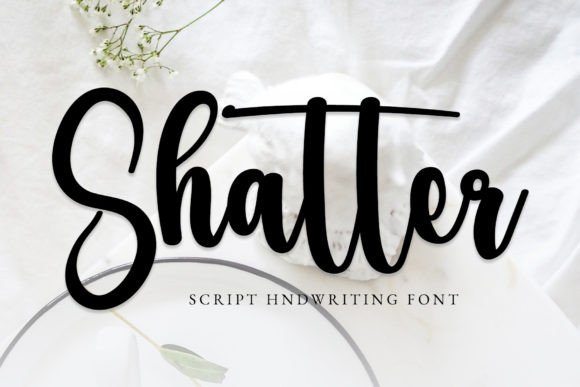
Shatter is defined by its dainty script style, making it particularly suitable for projects that require a touch of sophistication without overwhelming the viewer. It is designed to be used in contexts where a "beautiful script taste" is essential. This includes branding initiatives where a logo needs to feel personal and hand-crafted, label designs for artisanal products, or photography watermarks that need to be legible yet unobtrusive. The font's versatility extends to special events, such as wedding invitations or corporate gala materials, where the emotional resonance of the text is paramount.
When evaluating Shatter against other tools in your arsenal, consider the specific phase of the project you are in. In the early planning stages, Shatter might serve as a mood-setter, helping to define the visual language of a campaign. During the execution phase, it becomes a functional asset for creating headers, signatures, or decorative elements. Because it is a script font, it interacts differently with layout grids than block letters do. It demands more attention to spacing and hierarchy, requiring the designer to ensure that the delicate strokes remain readable even at smaller sizes.
Technical Considerations: PUA Encoding and Glyph Access
A critical factor in the practical implementation of any font is its technical architecture. Shatter utilizes PUA (Private Use Area) encoding, a feature that significantly impacts how designers access and utilize its full potential. Standard fonts often limit users to a basic set of characters found on a physical keyboard. However, PUA encoding unlocks a comprehensive library of glyphs, swashes, ligatures, and alternate characters that are not mapped to standard ASCII values.
This encoding method means that accessing all of the glyphs and swashes with ease requires a specific workflow adaptation. When working in professional software like Adobe Illustrator, InDesign, or Photoshop, you may need to use the Character panel or OpenType features to trigger these special characters. While this adds a layer of complexity compared to using a standard font, it offers unparalleled control over the final output. You can swap a standard 'a' for a swash version, adjust the flow of a signature, or create unique ligatures that tie the design together. For creators who prioritize customization, this level of control transforms the font from a simple text tool into a dynamic design element.
- Preparation: Before starting a project, familiarize yourself with the specific PUA character map of Shatter. Many font libraries provide a glyph sheet that maps these hidden characters to their visual forms.
- Implementation: Use the font's alternate character palette to introduce variety. Avoid repetitive patterns by mixing standard letters with swashes and flourishes strategically.
- Quality Control: Test your designs across different devices and print mediums. Ensure that the PUA-encoded characters render correctly on web platforms and maintain their integrity when exported to PDFs.
Strategic Integration Across Business Workflows
The application of Shatter varies depending on the nature of the business or creative endeavor. For small business owners and entrepreneurs, consistency is key to building brand recognition. Integrating Shatter into a branding project requires a clear strategy regarding where the script should appear versus where neutral fonts should dominate. A common effective approach is to use Shatter for the primary logo mark or the tagline, while relying on clean, geometric sans-serifs for body copy and operational documents. This creates a balanced visual hierarchy that feels both artistic and professional.
For photographers and visual artists, the workflow integration often centers around protection and presentation. Adding a watermark is a necessary step in protecting intellectual property, but it can also be an opportunity to reinforce brand identity. Using Shatter for a watermark ensures that the attribution is elegant rather than intrusive. The dainty nature of the script allows it to blend into the composition without competing with the subject matter, provided it is placed with care and appropriate opacity.
Marketers and content creators can leverage Shatter for social media assets and email newsletters. In a feed dominated by bold headlines and stark imagery, a dainty script can break up the visual monotony and draw the eye to specific calls to action or featured quotes. However, this requires strict adherence to quality control standards. If the resolution is too low or the contrast is insufficient, the fine details of the script will disappear, leading to a loss of clarity. Always preview your designs at 100% zoom before publishing to ensure the intricate details of Shatter remain sharp.
Optimizing Efficiency and Organization
Efficiency in design workflows is often hampered by poor file management and inconsistent resource usage. To integrate Shatter smoothly, organize your font files and asset libraries systematically. Create a dedicated folder for script fonts and sub-categorize them by style, weight, or intended use case. Since Shatter relies on PUA encoding, ensure that the correct version of the font file is installed on all machines involved in the project. This prevents issues where a designer sees a beautiful swash on their screen only to find it replaced by a default system font when the file is opened elsewhere.
Collaboration is another area where proper preparation pays off. When handing off files to clients or team members, include a font manifest or a brief guide explaining the use of Shatter. If the recipient does not have the font installed, they may not see the intended swashes or alternates. Providing a preview image or a PDF proof that flattens the text layers can help stakeholders visualize the final product accurately. This transparency reduces revision cycles and ensures that the creative vision is preserved throughout the approval process.
Long-Term Usability and Adaptability
Sustainability is a vital component of any design decision. Fonts that are trendy today may feel dated tomorrow, but Shatter's classic script structure suggests longevity. Its dainty and stylish nature aligns well with timeless design principles, making it a reliable choice for projects that need to endure. However, long-term use also depends on accessibility and adaptability. As digital consumption shifts towards mobile-first experiences, the legibility of script fonts becomes increasingly important.
When planning for the future, consider how Shatter will scale. Will it remain readable on a smartwatch notification? Can it be used effectively in a high-contrast dark mode interface? Testing these scenarios during the initial design phase prevents costly redesigns later. Furthermore, as your brand evolves, you may need to pair Shatter with new typefaces. Establishing a flexible typographic system early on ensures that you can swap out supporting fonts without compromising the core identity established by the script.
Ultimately, the successful integration of Shatter comes down to understanding its strengths and limitations within your specific context. It is not a one-size-fits-all solution, but rather a powerful tool that, when used with intention, can elevate the quality and impact of your work. By focusing on preparation, technical compatibility, and thoughtful placement, you can harness the beauty of this font to support your goals, whether you are launching a new brand, protecting your photography, or crafting a memorable event experience. The result is a cohesive, professional output that resonates with your audience and stands the test of time.