Why Fingerline Is the Modern Handwritten Script Font Your Brand Needs
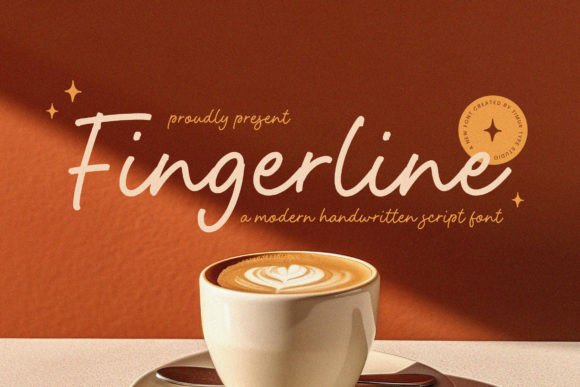
In a digital landscape dominated by rigid grids and uniform sans-serifs, finding a typeface that feels genuinely human can be a challenge. Fingerline emerges as a solution for creators who want to bridge the gap between high-end sophistication and casual approachability. This modern handwritten script font is not merely a decorative element; it is a tool designed to inject effortless grace into projects ranging from wedding invitations to corporate branding.
However, simply downloading a beautiful font does not guarantee success. Many designers and business owners make critical errors when selecting and applying script typefaces like Fingerline, often resulting in designs that feel messy rather than elegant. Understanding the nuances of this specific font family can save you time, money, and professional reputation.
The Distinctive Character of Fingerline
What sets Fingerline apart from other scripts on the market is its unique balance. It blends elegance with a touch of informality, avoiding the overly formal stiffness of traditional calligraphy or the chaotic illegibility of many amateur handwriting fonts. Each letter is crafted with meticulous detail, ensuring that while the strokes flow naturally, the text remains highly readable.
This duality makes it ideal for projects seeking a balance between sophistication and approachability. When used correctly, it adds a unique, human touch that resonates with modern aesthetics. Whether you are an entrepreneur designing a logo, a blogger creating headers, or a small business owner crafting packaging, Fingerline provides a personality that standard fonts lack.
Common Pitfalls in Using Script Fonts
Even with a high-quality font like Fingerline, poor execution can ruin a design. The most frequent mistake is overusing the font. Because it has such a strong personality, using it for body text or entire paragraphs often leads to reader fatigue. Scripts are best reserved for headlines, logos, short quotes, or accent text. If you attempt to write a long article in Fingerline, you will likely find that your audience struggles to scan the content effectively.
Another common error involves ignoring kerning and spacing. Handwritten fonts rely heavily on the relationship between letters to maintain their rhythm. Without adjusting the tracking (letter-spacing), words can look either too tight or too loose, breaking the illusion of natural handwriting. In Fingerline, gentle curves require slightly more breathing room than blocky serif fonts to prevent characters from colliding visually.
- Misjudging Legibility: Assuming all scripts are equally readable. Fingerline is designed for clarity, but context matters.
- Poor Color Contrast: Pairing the font with low-contrast backgrounds can make the flowing strokes disappear.
- Clashing Styles: Combining Fingerline with other ornate scripts creates visual chaos rather than harmony.
Strategic Applications for Maximum Impact
To get the most out of Fingerline, you must understand where it shines brightest. Its flowing strokes and gentle curves evoke a sense of effortlessness, making it perfect for editorial design where you want to highlight a story without distracting from the text.
For branding, this font works exceptionally well for businesses that want to appear friendly yet professional. Think of boutique coffee shops, artisanal food brands, or creative agencies. The distinct personality of each letter enhances brand recognition without shouting for attention. However, avoid using it for industries that demand absolute rigidity, such as law firms or heavy machinery manufacturers, unless you are aiming for a very specific, unconventional rebrand.
When creating invitations or event materials, Fingerline allows you to convey warmth immediately. The human touch it provides helps recipients feel personally addressed, which is crucial for engagement rates in marketing campaigns. A simple email header or a social media graphic featuring this font can significantly increase click-through rates compared to generic alternatives.
Evaluating Quality Before You Buy
Before purchasing or downloading any font, including Fingerline, you must verify the technical quality. Many cheap fonts suffer from missing glyphs, incorrect ligatures, or poor hinting that looks terrible at small sizes. Fingerline is renowned for its comprehensive character set, but you should always check the preview files to ensure that special characters and punctuation marks align with your specific needs.
Consider the file format compatibility as well. Ensure the font supports OpenType features if you plan to use advanced typographic controls like swashes or alternate characters. These features allow you to swap out certain letters for more decorative versions, adding another layer of customization to your design. If a font lacks these options, you may find yourself limited in how creatively you can apply it.
Also, review the licensing terms carefully. Some fonts restrict commercial use, meaning you cannot use them in client work or products you sell. Fingerline is generally available for various uses, but confirming the specific license for your project prevents legal headaches down the road. Always read the fine print regarding web embedding, app usage, and print runs to ensure compliance.
Optimizing Readability and Flow
One of the most overlooked aspects of typography is the interaction between the font and the line height. Because Fingerline has ascenders and descenders that extend beyond the baseline, setting the line spacing too tight will cause the tails of letters to collide with the lines above and below. To maintain readability, increase your leading (line-height) to approximately 1.5 times the font size.
Furthermore, consider the medium where your design will live. On mobile devices, screen resolution varies widely. While Fingerline looks stunning on high-resolution desktop monitors, it may lose some of its delicate details on smaller screens. Test your designs across different devices before finalizing them. If the script becomes jagged or blurry on a phone, you may need to adjust the font size or switch to a simpler version for mobile views.
Pairing is also critical. Fingerline pairs beautifully with clean, geometric sans-serifs like Helvetica or Roboto. The contrast between the organic curves of the script and the structured geometry of the sans-serif creates a dynamic visual hierarchy. Avoid pairing it with other scripts or serif fonts, as this tends to create a cluttered and dated appearance. Stick to one dominant style per layout to let the Fingerline stand out.
Practical Tips for Implementation
If you are new to working with scripts, start small. Use Fingerline for a single word in a headline or a signature line on a contact card. Observe how it interacts with the surrounding whitespace. As you gain confidence, experiment with larger compositions. Remember that less is often more when dealing with expressive typefaces.
Always test your color choices. Dark gray or deep navy often looks more sophisticated than pure black when paired with a script font, reducing eye strain while maintaining contrast. Conversely, light pastel backgrounds can make the font pop, provided the stroke weight is sufficient to remain visible.
By focusing on these practical adjustments, you can avoid the common pitfalls that plague many amateur designs. Fingerline offers a versatile toolkit for modern communication, but it requires thoughtful application to truly shine. When used with intention, it transforms ordinary layouts into memorable experiences that connect with your audience on a deeper level.
Whether you are a seasoned designer looking to refresh your portfolio or a small business owner trying to establish a unique voice, taking the time to master the nuances of Fingerline will pay off. It is not just about having a pretty font; it is about communicating your message clearly and stylishly. With the right approach, this contemporary handwritten script font becomes an invaluable asset in your creative arsenal.