Smart Teacher: Elevating Your Designs with Elegance
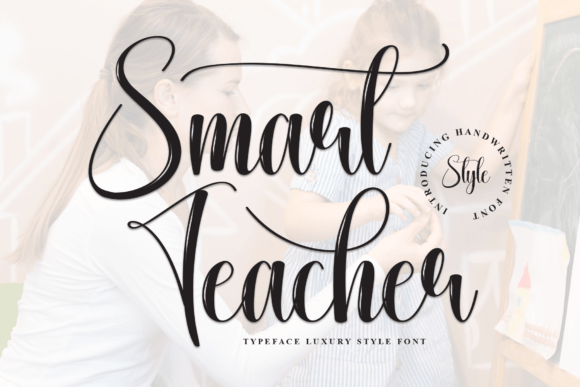
You have likely spent hours searching for the perfect font to capture a specific mood, only to settle for something that feels slightly off. It happens to everyone. You want your design to speak with a voice that is both personal and professional, but often, the tools you choose fall short of that mark. This is where Smart Teacher steps in as a transformative solution. It is not merely another typeface; it is a stylish and incredibly elegant script font designed to bring a handwritten touch to projects that demand sophistication.
Whether you are crafting wedding invitations, designing thank you cards, or creating a brand identity for a boutique business, the right typography can make or break the first impression. Smart Teacher offers a fluid, organic feel that mimics the natural flow of handwriting without sacrificing legibility or structure. However, simply downloading a beautiful font does not guarantee success. Many designers and business owners make subtle errors when integrating script fonts into their workflows, leading to results that look amateurish rather than polished.
The Trap of Overuse and Context
One of the most common mistakes I see creators make is assuming that because a font looks stunning in isolation, it will work everywhere. Smart Teacher is undeniably striking on wedding invitations and greeting cards, where the context allows for artistic flair. However, applying this same elegance to a technical manual, a dense block of body text, or a low-resolution social media ad can be disastrous. The human eye needs contrast between scripts and sans-serifs to maintain readability.
If you use Smart Teacher for large blocks of text, you risk exhausting your audience. Scripts are meant for emphasis, headlines, and decorative elements, not for conveying complex information efficiently. When used correctly, it acts as a highlighter, drawing attention to key messages. When overused, it becomes visual noise that obscures your content. Always ask yourself: does this project need a handwritten touch, or does it need clarity? If the answer leans toward clarity, reserve Smart Teacher for titles and signatures.
Neglecting Technical Compatibility
Before you commit to using Smart Teacher in a final project, you must consider the technical environment where it will live. A frequent oversight among hobbyists and even professionals is failing to check file formats and web compatibility. While a script might look perfect on your high-resolution monitor during the design phase, it can render poorly on mobile devices or print materials if the wrong format is selected.
Ensure you have the correct licensing for your intended use. Commercial projects, such as logos for small businesses or marketing materials for freelancers, require different permissions than personal hobbies like scrapbooking. Using a font without the proper license can lead to legal complications and financial penalties down the line. Furthermore, if you plan to embed this font on a website, verify that it supports the necessary web font formats (like WOFF2) to ensure it loads quickly and displays correctly across all browsers. A slow-loading page due to heavy font files can hurt your SEO rankings and frustrate visitors.
Evaluating Legibility and Readability
Another area where users often stumble is the assumption that "elegant" automatically means "easy to read." While Smart Teacher is designed with balance in mind, every script has its quirks. Letters like 'a', 'g', and 't' can sometimes merge in ways that confuse the reader if the spacing is too tight. Before finalizing any design, always test your work at the actual size it will be viewed. What looks clear on a 27-inch screen might become illegible on a standard business card or a thumbnail image.
To avoid this pitfall, adjust your kerning and tracking carefully. Script fonts rely heavily on the relationship between characters. If the letters are too far apart, the connection is lost, and the word breaks apart visually. If they are too close, they blur together. Take the time to manually tweak these settings rather than relying solely on the default auto-kerning provided by your software. This extra step ensures that the fluidity of Smart Teacher remains intact while maintaining sharpness.
Choosing the Right Pairing Font
A script font never works alone; it needs a partner. A common error is pairing Smart Teacher with another decorative or serif font that competes for attention. This creates a chaotic visual hierarchy where the viewer does not know where to look. The goal is to create a harmonious blend where one font supports the other.
For a sophisticated look, pair Smart Teacher with a clean, geometric sans-serif or a classic, understated serif. These neutral companions allow the elegance of the script to shine without distraction. For example, when designing a logo for a wedding planner, using Smart Teacher for the main name paired with a simple, thin sans-serif for the tagline creates a balanced composition. This approach signals professionalism while retaining the personal touch that clients crave.
- Check the weight: Ensure the weights of your paired fonts complement each other. A heavy script needs a lighter supporting font to avoid overwhelming the design.
- Consider the mood: If Smart Teacher provides a romantic feel, your secondary font should reinforce that emotion, not clash with it.
- Test in grayscale: Sometimes colors hide poor font choices. Convert your design to black and white to see if the hierarchy still holds up.
Maximizing Value Through Proper Application
Investing in a high-quality font like Smart Teacher is an investment in your brand's perception. To get the most out of it, treat it as a strategic asset rather than just a visual decoration. Educators, marketers, and entrepreneurs should think about how this font communicates their values. Does the flowing nature of the script align with the message you are trying to convey? If you are selling a product that requires precision and speed, a highly ornate script might send the wrong signal.
Instead, focus on the emotional connection. Use Smart Teacher to evoke feelings of care, tradition, and personal attention. Whether you are writing a heartfelt thank you note or launching a new product line, the font should act as the bridge between your intent and the recipient's experience. By avoiding the common pitfalls of overuse, poor pairing, and technical neglect, you ensure that your designs remain effective, efficient, and aesthetically pleasing.
Take the time to explore the full range of Smart Teacher. Experiment with different sizes, colors, and layouts. Don't be afraid to make mistakes during the experimentation phase, but learn from them before presenting your final work. With the right approach, this elegant script can transform ordinary designs into memorable experiences that resonate deeply with your audience.